The Independent's journalism is supported by our readers. When you purchase through links on our site, we may earn commission.
I tested Xbox’s $1,000 ROG Ally X — and I’m conflicted
I got my hands on the new ROG Xbox Ally X before its official release, so I can bring you my honest thoughts
Microsoft has officially joined the handheld console race. After the tech giant announced it was teaming up with Asus to launch two Xbox-branded versions of the ROG Ally back in June, Microsoft’s portable gaming PCs, designed with Xbox players in mind, have officially landed.
The standard ROG Xbox Ally costs $599 and is essentially a re-skinned version of the original Asus ROG Ally, but with a new Xbox button and deeper Xbox Game Pass integration. The more premium ROG Xbox Ally X costs $999 and brings more hardware upgrades found on Asus’s Ally X, including a larger battery, double the storage, improved cooling and a redesigned grip that feels better in the hands.
I’ve been testing the more premium version for a few days now, and after putting it to the test, I have to say, I’m blown away. Having not previously been hands-on with an Asus ROG Ally before, it’s great to have all my game libraries, from Game Pass to Steam, all in one single place. But would I buy one at its recommended retail price? That’s a trickier question to answer.
How I tested

I’ve been testing the ROG Xbox Ally X console for a few days. The console took a bit of time to set up, but once I’d gone through the onboarding, I signed in to my usual game stores (Steam, Xbox Game Pass and Epic) and downloaded a few titles to test. When reviewing, I looked at user experience, performance, the display and battery life. I’ve broken down exactly how I tested the ROG Xbox Ally X at the end of my review.
Why you can trust IndyBest U.S. reviews
The Independent employs knowledgeable reviewers to test the latest products, to bring you impartial, honest reviews and recommendations. Jake Brigstock is The Independent’s gaming correspondent. He has spent countless hours putting a full spectrum of consoles and games through their paces. Jake’s experience and critical eye mean he is well-placed to bring you his review of the ROG Xbox Ally X.
ROG Xbox Ally X

- Release date October 16 2025
- Operating system Windows 11 Home
- Processor AMD Ryzen AI Z2 Extreme
- Screen 7-inch touchscreen, full HD (1920 x 1080p), 120Hz with variable refresh rate (VRR)
- Weight 715g
- RAM 24GB
- Storage 1TB
- Ports USB4 Type-C, USB 3.2 gen 2 Type-C, microSD reader, 3.5mm audio jack
- Network and communication Wifi 6E and Bluetooth 5.4
- Xbox full screen experience New modifications that focus on gaming, minimise background activity and defer non-essential tasks
- Why we love it
- All PC storefronts in one place
- Play games natively on the go
- Handles newer releases really well
- Take note
- Expensive
- Screen size can lead to it feeling fiddly during setup
ROG Xbox Ally X design
When it comes to unboxing the handheld device, you’re greeted with three things: the console itself, a charging plug, and a small stand. Given that it’s a handheld console designed for on-the-go use, I was surprised to see that a travel case wasn’t included, especially when you consider the price.

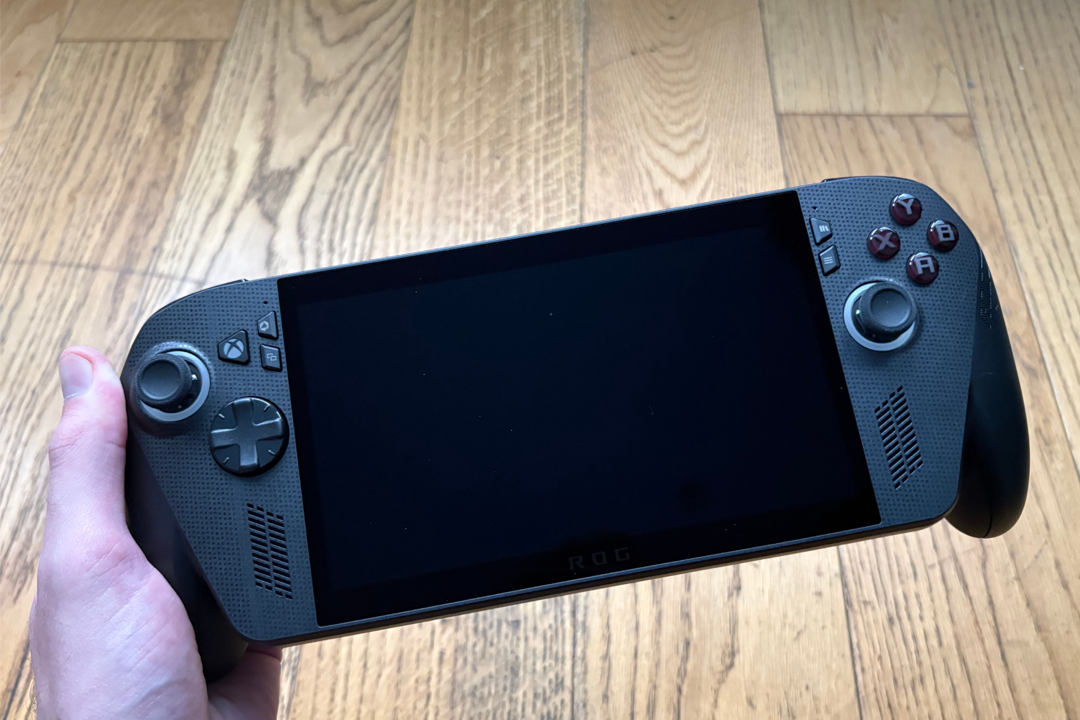
In terms of design, it looks almost exactly like the original ROG Ally X, with a 7-inch screen, controller layout, and back buttons, but it does have some Xbox-specific features and some updates. For example, key differences include the dedicated Xbox button and contoured grips, which make it feel more ergonomic. It feels like you’re using a controller with a screen in the middle.
The layout’s familiar — two sticks, a D-pad, ABXY buttons, bumpers, triggers and the usual view and menu keys. There’s also a command centre button in the top left that opens Asus’s Armoury Crate software (more on that later), plus a library button that pulls together all your installed games and storefronts in one place.
ROG Xbox Ally X setup
The ROG Xbox Ally X runs Windows 11 and has a streamlined setup, but downloading the exact storefronts and games I wanted took more time. That’s not a surprise, given it’s an Xbox handheld first and foremost, though Steam apps are on the console already. Additional storefronts such as Epic Games, GOG, and the EA app need to be downloaded separately. I did like that all my the libraries could be pulled up with a press of a button.
Downloads can also be managed in the same way as a Windows PC. But instead of a mouse and keyboard, you use the touchscreen and controller. This let me organize the console in the way I wanted, such as moving games into folders and customizing the taskbar and start menu. Having said that, the 7-inch screen is small, so moving things around can be fiddly, and I often found myself doing something I hadn’t intended, such as opening apps and moving things into places I didn't want to.
The Armoury Crate acts as the console’s main control hub. It’s where you tweak performance modes, adjust resolution and refresh rate, and fine-tune the system’s settings all in one place.

Having not used a handheld PC before, it took me a little while to get everything set up. But once I found my footing and switched to the Xbox full-screen mode, downloading and jumping between apps felt seamless.
ROG Xbox Ally X games, performance, and battery life
As mentioned earlier, the Xbox app comes preinstalled on the machine, along with the Microsoft Store and Steam, but you can also download Battle.net, the EA app, Epic Games store, GOG Galaxy, and Ubisoft Connect.
The console has three power modes to choose from. Silent mode prioritizes battery life; performance mode has the best mix of power and efficiency; and turbo mode pushes the hardware to its limits. Throughout my time playing, I ran the ROG Xbox Ally X on turbo mode with full HD resolution and with no cap on the refresh rate. I played several games from the Xbox app, Microsoft Store, Steam, the EA app, and Epic Games Store.
I started with Final Fantasy XIII from the Microsoft Store — a pretty divisive entry in the series and not exactly known for being a great PC port. I was curious to see how it would run here, so I first played through the opening chapter on my heavy-duty Acer Predator Helios 16 gaming laptop before continuing on the Xbox Ally X. While there were occasional frame rate dips and stuttering in cutscenes, performance was fairly similar between both machines, which suggests the game’s port is the bottleneck, not the hardware.
Next, I streamed Forza Horizon 5 via the Xbox app on a 350Mbps wifi connection. Aside from a bit of stutter at the start, it ran beautifully at 1080p and 60fps with no major issues.

I also streamed the fast-paced, first-person shooter Doom: The Dark Ages. The game itself ran smoothly, but the resolution looked poor. It didn’t seem to reach beyond 720p, even with every setting maxed out. Visually, it looked noticeably worse than playing on the Xbox Series S
Meanwhile, Clair Obscur: Expedition 33 — the indie RPG currently in the running for several game-of-the-year lists — looked far better at 1080p. That said, even with the refresh rate uncapped in both the console and game settings, performance stayed around 30fps. It still looked sharper and more detailed than on my Xbox Series S, though.
Next, I tried Borderlands 4 through Steam. Using the same settings, frame rates fluctuated quite a bit in open-world areas compared with my gaming laptop. Then again, Borderlands 4 isn’t known for its optimization. Dropping the resolution a little helped smooth things out, and mods can improve stability even further.
The real highlight, however, was when I played Destiny 2 through Epic Games. This game pushed the ROG Xbox Ally X to its absolute limits, but the console really stood up to the test. It played the game at 1080p and 120fps. It looked fantastic and played. Neither the resolution nor frame rate dipped. I was simply in awe at just how well it performed.

Next up was the recently released Skate, which I played through the EA app. Unfortunately, I noticed some texture pop-ins whenever I entered new areas, something I’ve never experienced while playing on my PS5 or gaming laptop.
Finally, I fired up the first-person parkour classic Mirror’s Edge, also through the EA app. I’ve always loved this game, and it’s amazing how well the 17-year-old title still plays today. Sprinting across the City of Glass at 1080p and 60fps on the ROG Xbox Ally X was a thrill, making me feel like a teenager again, staying up later than I meant to just to keep playing. It’s the best the game has ever looked without mods.
One thing to note. When playing really demanding games like these, I averaged just over two hours of battery life on a single charge. Less intensive titles can stretch that further, but pushing the Ally X to its limits really drained the battery.
Should you buy the ROG Xbox Ally X?
I’m really conflicted about the ROG Xbox Ally X. It’s the first time we’ve seen Microsoft’s Xbox brand attached to a Windows handheld, and that partnership instantly makes it feel more cohesive than most portable gaming PCs. From the moment you power it on, it boots straight into the Xbox app, with Game Pass front and centre and your cloud saves ready to pick up exactly where you left off. That tight integration between PC and console gaming is where it really shines.
Beyond that, I love that you get all the PC storefronts and your entire PC library in a portable device. It’s amazing that you can now take your games anywhere on the go and for them to perform pretty well across the board. It’s unlocked so many more opportunities for me to take the games with me, especially as I can then seamlessly pick up where I left off when playing at home, and replay older titles I've been itching to play again for years.
But I can’t overlook the price. At $999, it’s steep. I couldn’t personally justify spending that much when a solid gaming laptop offers more power and a bigger screen for the same money. If you can comfortably afford it and love the idea of taking your Xbox and PC games anywhere, you won’t be disappointed. But for most people, investing in a full setup still makes more sense — unless portability really is the priority.
How I tested the ROG Xbox Ally X
I tested the Rog Xbox Ally X handheld console for two weeks. When considering whether it’s worth the $1,000 price, I assessed the following:
- User experience: The storefronts and games I downloaded are all ones I have access to already, so I did a direct comparison with my experiences of how everything runs on other hardware. I downloaded a mix of newer and older games to see how the console performs on all fronts, including ones that don’t traditionally run too well on PC.
- Display: When playing through these games, I took into account the overall performance, focusing on the resolution displayed, the frame rate, and any oddities such as texture pop-ins or tearing.
- Battery life: I put several hours into each of the games I downloaded. I had the console’s settings cranked up to the max, such as its highest resolution and refresh rate, to give a true test of performance and battery life.
Looking for more gaming inspiration? This is my Game of the Year 2025
Bookmark popover
Removed from bookmarks