The Independent's journalism is supported by our readers. When you purchase through links on our site, we may earn commission. Why trust us?
PlayStation 5 review: Is the bestselling console worth your money?
The PS5 is five years old, but the decision to upgrade is tricky with the PS6 on the way

It’s been five years since the Sony PlayStation 5 burst onto the scene, distracting us from those global events of the time. Five years later, and there’s no sign of a PlayStation 6, though Sony has retired the full-fat model in favour of a Slim model.
The PlayStation 5 promises lightning-fast load times, ray tracing visual improvements, haptic feedback from its DualSense controller and a huge catalogue of games. The PS5 Slim is basically the OG PS5, after it’s been on a diet. The question is: if you’ve still got a PS4, is it worth upgrading to the PS5 now or waiting for the PS6?
On paper, the PlayStation 5 offers identical hardware even though the PS5 Slim launched three years later in 2023. The biggest distinction right now is that the PS5 Slim has become the standard model at £479.99 with a disc drive, or £389.99 without.
I’ve spent the past five years testing and playing the Sony PlayStation 5 perhaps a little too much. Here’s how I found my experiences with it and whether I think the Sony PlayStation 5 is worth buying in 2026. Spoiler alert: yes, it remains my console of choice.
Best VR headsets for immersive virtual reality gaming
Valve’s Steam Machine console launches next year, here’s what we know

I’m a gaming writer and these are the 10 best PS5 games of all time
Best handheld games consoles in 2025, tried and tested

I’m a gaming writer and this is the one game you need to play this year
How I tested
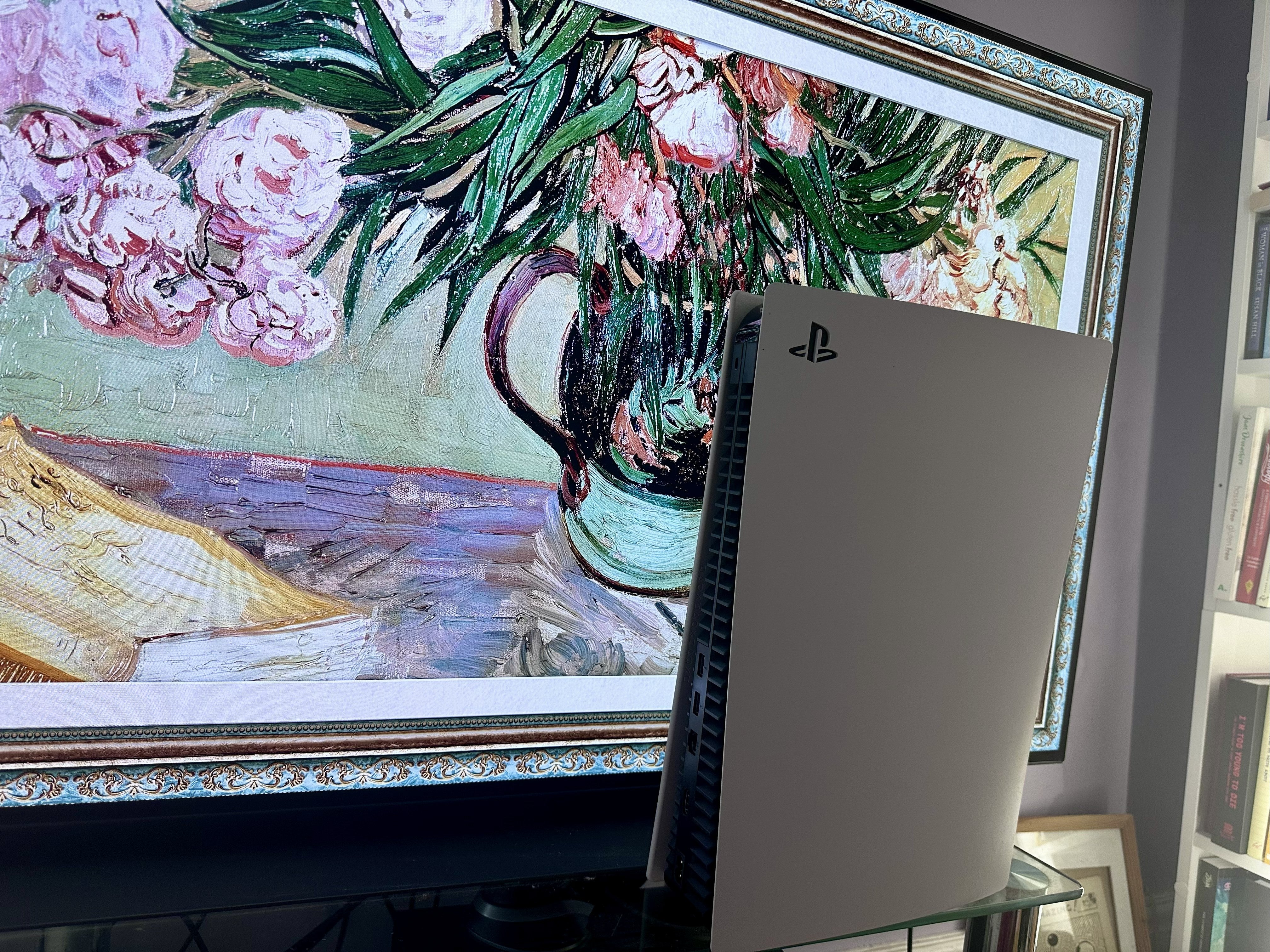
I’ve used the Sony PlayStation 5 most days for the past five years. I’ve used it as a gaming console but also as a video playback device for watching seemingly every streaming app you’ve ever heard of, as well as Spotify and Apple Music. It began life connected to a 50in Sony 4K TV and for the last four years, it’s been connected to a 49-inch LG C1 OLED TV with a Sony Dolby Atmos soundbar to enhance the sound quality. When reviewing, I looked at how easy it is to use with games and video content, performance, and its design and style. You can read my full testing methodology at the bottom of the article.
Sony PlayStation 5

- CPU Custom 8-core AMD Zen 2 variable frequency up to 3.5 GHz
- GPU Custom AMD RDNA 2 36 CUs variable frequency up to 2.23 GHz 10.3 TFLOPS peak
- Memory 16 GB/256-bit GDDR6 SDRAM + 512 MB DDR4 RAM (for background tasks)
- Storage Custom 1TB PCIe 4.0 NVMe SSD
- Resolution Up to 8K
- Why we love it
- Fantastic exclusives
- The best controller around
- Backwards compatible with many PS4 titles, and also older PS generations
- Distinctive design
- Take note
- PS5 Slim is slightly smaller
- PS5 Pro is more powerful
Sony PlayStation 5: Design

The PlayStation 5 is a sizeable beast but a weirdly appealing one. It looks like it wants to stand out, unlike the hulking, breeze-block-style Xbox Series X, which I’ve never found attractive. While Sony no longer sells the original PS5, its design still matters, particularly as the newer PS5 Slim sticks very closely to the same look.
The PS5 Slim is around 30 per cent smaller and about 18 per cent lighter, but the overall design language is largely unchanged. The most obvious differences come down to size and ports rather than any dramatic rethink. One area where the Slim does diverge is flexibility: the PS5 Slim Digital model can be upgraded with an external disc drive if you want to play physical media.
On the OG model, the disc drive is practically hidden away so you might need to practice finding it, but it’s quite a sleek design. There are slightly raised buttons for power and eject so you won’t accidentally tap them. Just alongside that front interface is one USB-A port and one USB-C port. That’s in contrast to the PS5 Slim, which has two USB-C ports at the front. Both versions provide two USB-A ports at the back of the console.
I still have accessories which use USB-A ports so having a mixture of the two at the front proves most useful to me, and I suspect most people. Right now, my front USB-A port is used for a keyboard while the USB-C port is used less frequently.
The standard PS5 has 825GB of usable storage, while the PS5 Slim increases that to 1TB. Both consoles can be upgraded with an SSD drive, with the process being pretty simple in either case.
Sony PlayStation 5: Setup and use
If you’ve used pretty much any games console in the past 20 years, you’ll know what to expect for the PlayStation 5 setup. Plug in the HDMI cable and power connector, enter your Wi-Fi details (or plug in the Ethernet cable), and you’re mostly all set. You’ll need a PSN account too but if you’ve owned a PS3 or PS4, you can use the same details.
Once the basics are out of the way, it’s pretty simple to navigate the UI. A simple flick from top to bottom switches you between games and video content – a nice touch for anyone using their console as both an entertainment machine and as a games system. Sizeable icons provide insight into what you can play, with new games installed via the PSN store or through physical disc.
PlayStation Plus is worth considering if you want an extended catalogue of games to play, with three tiers offering varying amounts of titles at a price. If you want to play games online, most will also require a basic PlayStation Plus subscription.
It’s hard to find fault in the PlayStation 5 UI. It’s a little plain at times but that means you can find what you need without looking too hard. Even taking screenshots and sharing them with your friends is a simple process.
Sony PlayStation 5: Performance
The original Sony PlayStation 5 offers the same performance as the PS5 Slim. That means 120fps at 4K resolutions (and five years in, you’re much more likely to have a TV to show off that splendour), or up to 60fps at 8K if you’re lucky enough to have an 8K TV.
The PlayStation 5 uses a custom SSD which is designed to provide fast loading times. Launch titles like Marvel’s Spider-Man 2 demonstrate this perfectly. You can fast travel across the city in a seamless fashion, never noticing the join between sections. That experience is identical on the original PS5 and PS5 Slim.
The PlayStation 5 has an excellent library of exclusive console games. There’s The Last of Us series, Horizon Forbidden West, Marvel’s Spider-Man 2, Gran Turismo 7, Ratchet & Clank: Rift Apart, Returnal, God of War Ragnarok and many more. Some are now available on PC but for console players, they remain Sony’s property. There are also many multi-platform gems like Elden Ring, Red Dead Redemption 2, Baldur’s Gate 3 and Grand Theft Auto V.
Games look fantastic as you would expect from the hardware involved, but it’s the DualSense controller that really makes the experience special. The vibration of haptic feedback feels great while adaptive triggers give you more control as you squeeze your way to victory. It’s particularly noticeable when webslinging in Marvel’s Spider-Man 2 but also racing games like Gran Turismo 7.
Should you buy the PlayStation 5?
The Sony PlayStation 5 remains a great option for gamers. It has a consistently growing catalogue of exclusive games, even with some of those now on PC. The controller is hard to match, feeling satisfying to use every step of the way. It also works well as an entertainment system. You can use it with pretty much every streaming service imaginable, but also as a Blu-Ray player if you’re sticking with physical media, you can bolt on a disc drive to a digital PS5 Slim at a later date. I find the mix of USB ports useful but that’s a relatively niche improvement over the Slim model which is otherwise smaller and offers more storage space. On the plus side, whichever model you go for, you’ll be happy with the PlayStation 5
With no sign of a PlayStation 6 arriving any time soon, there’s little reason to hold off if you’re still on a PS4. The PS5 Slim may now be the standard model, but the experience itself hasn’t changed. If you’re upgrading today, you’re getting a powerful console that will be well supported through 2026.
How I tested the PS5 in full
When writing this review, I looked at the following criteria:
- Performance: I've played games on the PlayStation 5 extensively since its launch. These include relatively undemanding but popular games like Minecraft and Fortnite, as well as more visually taxing titles such as God of War Ragnarok and Final Fantasy VII: Rebirth. I also spent time keeping an eye on how quickly load times felt compared to other games consoles. There's no dedicated benchmark software for the PS5 but you can judge a lot with a timer and the knowledge that comes from using many games consoles over the decades.
- Ease of use: A games console needs to be simple to use, even if you're not an experienced gamer. I evaluated how simple it was to understand the PlayStation 5's user interface from finding games to buy and download to playing new titles. I also looked at how easy it was to switch between games and other apps and services like Spotify. I focused on making sure it was easy to figure out without needing to search for a solution or consult the manual. That also included delving into the settings to change visual features as well as set the console up for use with a soundbar and other audio equipment.
- Design: While the look of a console isn't the most important factor, it's useful to think about how nice the PS5 will look in your TV unit. I also checked where the USB ports and other connectors were located, and how easy they were to reach and to use with your favourite accessories. As the PlayStation 5's internal storage can be upgraded, I upgraded the storage on my own console and learned how simple it is to do.
- Longevity: As a console that's now five years old, I considered whether it's worth buying a PlayStation 5 today and which model if you decide to do so. That meant looking at the catalogue of games currently available, and determining whether it's worth the investment now or whether a new model is on its way soon.
Why you can trust IndyBest reviews
Jennifer Allen has been writing for The Independent since 2021. A gaming writer, she covers consoles, PC gaming and accessories, with experience reviewing hardware, games and peripherals.
Want to give VR gaming a go? Check out our round-up of the best VR headsets
Bookmark popover
Removed from bookmarks