The Independent's journalism is supported by our readers. When you purchase through links on our site, we may earn commission. Why trust us?
Bambu Lab H2D 3D printer review: Your own personal manufacturing hub
The highly anticipated H2D laser full combo is here but how do its features fare?

It was just three years ago that Bambu Lab arrived on the scene and instantly changed the 3D printing landscape. The company's range of machines is now seen as the 3D benchmark for all others to follow, and in the next evolution of the technology, the H2D laser full combo is here. The H2D once again aims to disrupt, combining makers’ favourites – such as a 3D printer, laser engraver, cutter and plotter – into one, essentially providing you with your own personal manufacturing hub.
It is worth noting from the outset that there are two versions available: the all-encompassing H2D laser full combo (which I'll be reviewing here) and a standard model solely focused on advanced multifilament 3D printing.
Whether you're prototyping a new product or producing small product runs from home, the H2D laser full combo looks to be the machine to realise your ideas and gives you the tools to handle every step of the manufacturing process.
After several weeks of hands-on testing, clocking up more than 1,000 hours, keep scrolling to find out how the machine stands up to the manufacturer's claims that the H2D is an “all-in-one solution”.

9 best home printers, tried and tested models for your office

The iPhone 17 price and launch date may have leaked – here’s what to know
11 best standing desks for the office and home, reviewed by a WFH expert

Best USB flash drives for terabytes of portable storage

Best MP3 players 2025: Top portable audio players tested by our expert
How I tested
I tested this 3D printer with the following criteria:
- Benchmarking and stress tests: I put the H2D laser full combo through standard 3D printing Benchmarking and stress tests, including 3DBenchy and Autodesk's Kickstarter model.
- Printing: Perhaps the most obvious test, I tested this machine on a series of dual and multi-colour prints, to assess the 3D print heads' dual-nozzle approach and the updated multifilament AMS (automatic material system).
- Laser cutter and plotter: I created laser-cut designs and illustrations engraved into wood, then vinyl cuts and cards, to test out the cutter and plotter.
- Production line: I ran a small production project – product, packaging and display – to see if the H2D could really be used as an all-in-one personal manufacturing hub.
- Wear and tear: From years of experience, I know how easily parts can wear and break beyond the test period, so for a professional spin, I installed the H2D in a local print farm, where it ran alongside their Bambu Lab X1C machines nonstop to produce products for summer shows. This approach highlighted the machine’s full potential and also revealed a few minor issues worth knowing before you invest.
Why you can trust IndyBest reviews
Alastair Jennings is a photographer, technology journalist and college lecturer with more than 30 years’ experience writing for magazines and websites. He specialises in cameras, drones, 3D printing and consumer tech, combining hands-on testing with practical advice for all skill levels. Alongside his journalism, Alastair lectures in photography, TV and film, sharing his expertise with the next generation of creatives.
Bambu Lab H2D laser full combo

- Print technology Fused filament fabrication (FFF)
- Build area 350 x 320 x 325mm sq
- Minimum layer resolution 0.08mm
- Maximum layer resolution 0.28mm
- Dimensions 492 x 514 x 626mm sq
- Weight 31kg
- Bed Heated/laser/cutting
- Print surface Flexible steel plate
- Software Bambu Studio, Bambu Suite
- Print speed 1,000mm/s
- Why we love it
- Three maker machines in one
- Easy to use
- Prints two filaments
- Take note
- Creates a lot of waste
- If things go wrong, DIY skills are required
Setting up the H2D couldn't be easier. Unlike the fiddly builds of older 3D printers, this machine arrives almost fully assembled straight out of the box. Simply place the AMS unit (the box that holds and automatically feeds the filament into the printer) on top, connect the tubes and cables at the back, and power up. The H2D then takes care of all calibration and setup, guiding you step-by-step through the entire process, including installing the filament.
This is one of the first printers to offer up to five filaments out of the box – four in the AMS multifilament unit and one for standard or specialist materials on the side. These specialist materials, such as carbon-fill and TPU (thermoplastic polyurethane), put far greater demands on printers but offer more flexibility, especially for professional use.
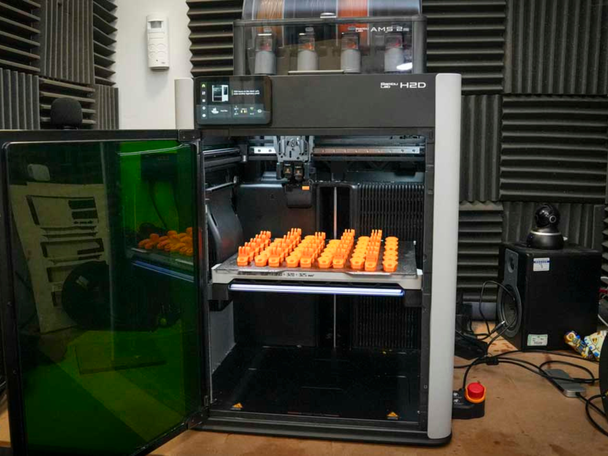
I dived straight in and started printing the benchmarks. One of the big advantages here is that the Bambu Lab software, BambuStudio, is straightforward to use, with plenty of online help to get you started. Compatible with both Mac and PC, you can use it with your computer connected directly, or, if you have the printer in a workshop, you can operate it remotely through your home network.
When the H2D laser full combo was announced, many of us hoped for a true multi-toolhead 3D printer, but at the moment, only the Original Prusa XL offers this potential with four tool heads. While the H2D is a multi-toolhead machine, those additional toolheads are modules that clamp onto the front of the main print head. These include the laser, cutter, and plotter modules. The always-in-place 3D printhead features two nozzles, meaning two filaments are always ready to go, double the usual amount, but less than many of us in the community had hoped for.
Why are more heads better than one? Well, it means there is less material waste and more speed, so two nozzles in one toolhead is a good halfway house. The waste issue really only becomes apparent when a third material is introduced, as one filament has to be retracted so the new filament can be used. As the filament swap is being managed and to avoid cross-contamination, the old and then new filament are purged to clear the nozzle, and this is where the filament waste can start to stack up.
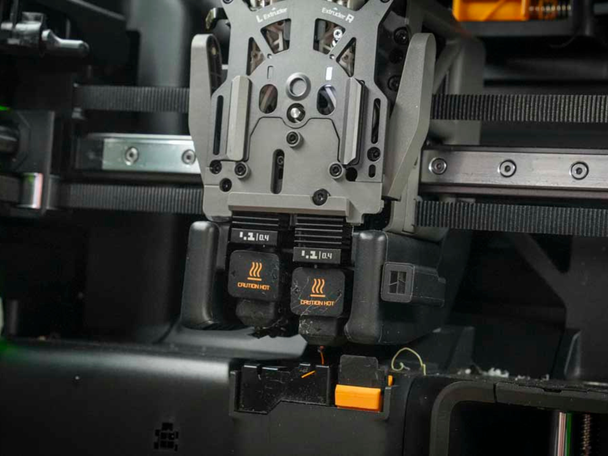
For the majority of the test, I placed the black filaments on the outer feeding spool, as it was the most commonly used, and this fed into the left-hand nozzle, cutting down on retractions and purging, with only the filaments in the AMS going through the right-hand nozzle needing to purge as they swapped.
When it comes to the more specialist materials, such as the rubberised material TPU, these can't go through the AMS and must go through the left nozzle supplied by the outer spool. The issue here is that the setup to get TPU printing requires the stretchy filament to be rerouted through the back of the machine through a third hole, which can prove fiddly, however good the end result is.
With standard materials such as PETG (polyethylene terephthalate glycol-modified), PLA (polylactic acid) and ABS (acrylonitrile butadiene styrene), this machine is highly optimised, so print failures were virtually non-existent during the initial tests.
To put the idea of using the H2D as a personal manufacturing hub to the test, I designed a simple GoPro-style handlebar mount. Multiple copies of the design were printed across the platform in a high-impact material, ASA (acrylonitrile styrene acrylate), which is both water- and UV-resistant, making it ideal for small-scale projects. The STL (stereolithography) files that I had created in a computer-aided design (CAD) application were imported directly into BambuStudio and then sent through the network to the machine. The total time for 28 units to print was one day and 11 hours, so it is by no means fast, but still quicker and cheaper than having tooling made for injection moulding. Once the print had finished, it was time to swap the tool head to create the packaging.
The cutter, plotter and laser all use a new piece of software called Bambu Suite, which, like Studio, is well laid out, but you’ll probably need to spend some time familiarising yourself with the layout before diving in.
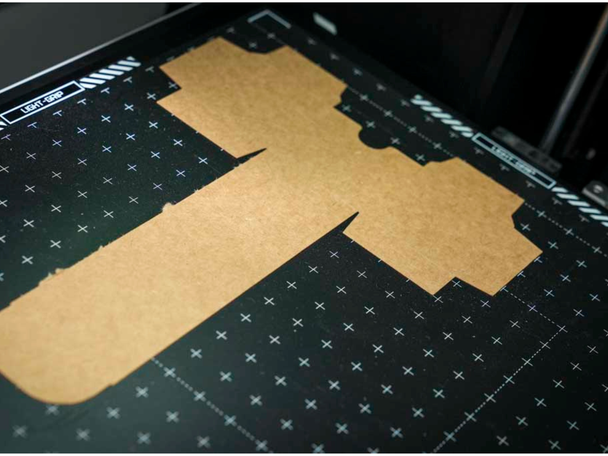
The next step was to create a product box. To start, I installed the pen head, which clamps in front of the 3D print head and, in turn, the cutter. Then, the graphics and meshes were loaded into the Bambu Suite software, everything was lined up, and then all that was left to do was hit go. The pen got to work, drawing on the card to create simple graphics. Each pen has one colour, but swapping for another is quick and easy if you want multiple shades on your material.
Once the graphics were finished, I swapped the pen for the cutter tool to cut out the box shapes, then manually glued them together. With everything set up in the Bambu software, once I’d hit go, each box was cut out perfectly and, unlike laser cutting, there was no scorching – just clean, precise lines.
The whole process of producing 28 GoPro-style mounts and accompanying packaging took about two days, although most of that time was spent printing. In reality, the active time is mostly spent laying things out in the Bambu Lab software and then assembling the boxes.
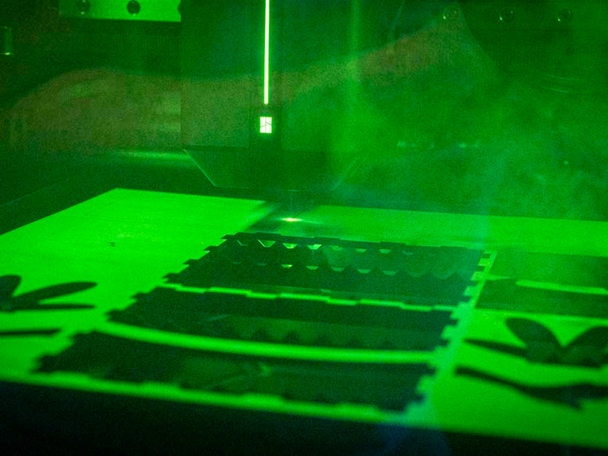
A major part of this machine is the laser cutter and engraver. If you want to sell in shops or at events, you'll need a display to show off your products. Swapping out the toolhead, removing the cutter and replacing it with the laser cutter takes just a couple of minutes. Using 3mm basewood ply, I laid out my design in the Bambu Lab software and sent it through to the H2D – another streamlined process.
Once the laser finishes cutting safely in its enclosed environment, the basewood can be removed. The parts push out and assemble easily with a bit of PVA glue, and I used the engraver to add a logo to the display, for a touch of personalisation.
When using the laser engraver, you do need an extractor. Bambu Lab makes its own, which I used for this review, with the filtration system helping to cut down fumes from both the laser and 3D printing processes.
The verdict: Bambu Lab H2D laser full combo
At the end of the testing period, it seems the H2D laser full combo has all of the tools required to produce multiple products, packaging and display. While the general production process is relatively simple, the software can initially be a little bit complex. While I focused purely on the small production hub use of the machine, using all tool heads, the laser area is rather small, and the real strength here is the multifilament printing. If you're thinking of using the machine for specialist materials, do consider that this is not the most straightforward to set up, but once done, the results are superb.
There are also some tweaks to the AMS system over the previous version, with the feeder funnels now ceramic rather than plastic and far more durable, which, for anyone running a print farm, will be welcome news. This product has huge potential; potential which is only limited by your imagination.
Want more recommendations? Check out IndyBest’s dedicated tech section, which is packed with all the latest reviews
Bookmark popover
Removed from bookmarks